
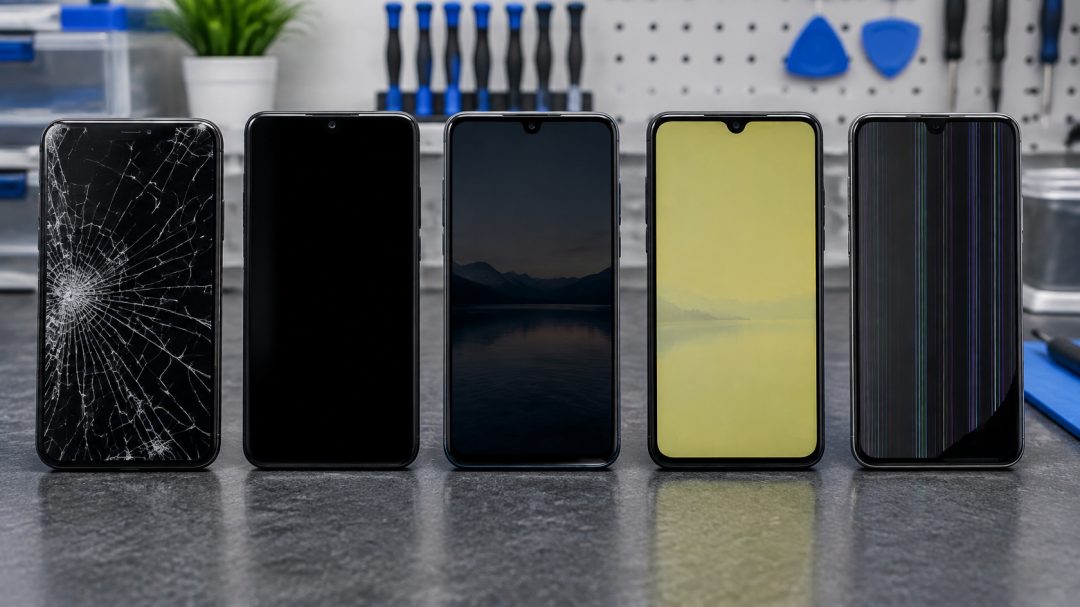
Phone screens take a beating every single day. According to Statista, screen damage is the most commonly reported smartphone problem, affecting 67% of owners. Knowing the top 5 common phone screen repair issues and solutions can save you time, money, and frustration.
Introduction
Phone screens are both the most used and most vulnerable part of any smartphone. One drop, one pressure point, one software glitch can turn a perfectly good display into a cracked, unresponsive, or discolored mess.
The good news is that most screen problems fall into a handful of predictable categories. Identifying the right issue makes it much easier to choose the right fix, whether that means a quick software reset or a professional repair.
Getting screen damage addressed quickly matters more than most people realize. Waiting too long often turns a manageable repair into a much costlier one, and understanding the top 5 common phone screen repair issues and solutions gives every phone owner a real advantage.
What Counts as a Phone Screen Repair Issue
A phone screen repair issue is any visible or functional problem with your display that affects usability or worsens over time. Some issues are obvious, like a shattered display. Others, like a faint yellow tint or a slightly dim backlight, are easy to overlook until they get worse.
Screen-related issues represent 65% of smartphone repairs worldwide, and display breakage alone triggers 45% of all repair requests. The main categories that count as screen repair issues include:
- Cracked or shattered glass: Visible breaks, chips, or spider-web fractures across the display surface
- Touchscreen failure: The screen does not respond to taps, swipes, or registers touches in the wrong location
- Dead pixels and dark spots: Small areas of the display that stay black, white, or a fixed color
- Screen discoloration: Yellow, green, or purple tints that affect part or all of the display
- Backlight failure: The screen appears dim, uneven, or completely black even when the phone is powered on
Issue 1: Cracked or Shattered Screen Glass
A cracked or shattered screen is the single most common phone repair issue owners face. According to WiFiTalents, cracked screens account for 62% of the mobile repair market, and Americans break two smartphone screens every second.
A crack is not just cosmetic. Ignoring it creates a 60% jump in the risk of hidden internal damage, and front screen cracks typically reduce a phone’s resale value by 40 to 60%.
Signs Your Screen Crack Needs Professional Repair
Some cracks are surface-level. Others signal deeper damage that needs attention right away.
Watch for these warning signs that a professional repair is the right call:
- Touchscreen stops responding in areas near or around the crack
- Discoloration or dark patches spreading from the crack line
- Glass lifting or separating from the phone body
- Sharp edges that create a cut risk during normal use
If any of these appear, powering off the device and seeking professional repair within 48 hours is the safest move.
DIY vs Professional Fix for Cracked Glass
DIY screen repair kits are widely available and cost between $30 and $80. They work best for minor surface scratches on older devices where the cost of professional repair does not make financial sense.
For most people, professional repair is the better path. According to Cellphone Carrier, 48% of consumers who cracked a screen chose a third-party repair shop, while only 18% attempted a DIY fix. Professional technicians have the right tools to replace glass without damaging the digitizer or display underneath, making the repair last longer.
Issue 2: Touchscreen Not Responding or Registering Wrong Touches
A touchscreen that does not respond to taps, or registers touches in the wrong spot, is one of the most disruptive screen problems a phone can have. Touchscreen problems account for 24% of all smartphone damage types reported by consumers, making a phone nearly unusable.
The encouraging part is that most of these problems do not require hardware repair at all.
Software Fixes to Try First
Approximately 80% of touchscreen issues have software origins, which means a few simple steps can often resolve the problem quickly and safely without any tools.
Try these fixes before heading to a repair shop:
- Restart the phone to clear temporary software conflicts
- Remove the screen protector since air bubbles or lifted edges interfere with touch sensitivity
- Update the operating system because software patches frequently address touch calibration bugs
- Clear the app cache for any app that triggers unresponsive behavior
When the Digitizer Needs Replacement
If software fixes do not resolve the issue, the digitizer (the layer beneath the glass that translates touch into input) may be physically damaged.
Hardware-caused touch failures typically follow a drop or liquid exposure. Software fixes resolve 70 to 90% of touch issues, so if the problem persists after troubleshooting, a digitizer replacement is likely needed. A professional technician can diagnose this quickly, and same-day repair is now available at 92% of independent shops with an average repair time of 30 minutes.
Issue 3: Dead Pixels and Dark Spots on the Display
Dead pixels are small points on the screen that fail to display correctly, and they require repair when they spread or disrupt visibility. They appear as tiny black, white, or fixed-color dots that do not change regardless of what is on screen.
LCD Damage vs OLED Burn-In
The type of display matters when diagnosing dead pixels and dark spots.
On LCD screens, dead pixels usually result from physical damage to the liquid crystal layer or a manufacturing defect. According to DisplayModule, 0.3% to 1.2% of newly manufactured IPS screens show obvious dead pixels due to production issues. On OLED screens, dark spots more often result from burn-in, where static images displayed for long periods permanently damage individual pixels. The fix for each is different, so identifying your screen type first makes the repair process easier.
Can Dead Pixels Be Fixed Without Replacement?
Sometimes, yes. It depends on whether the pixel is truly dead or just stuck.
Stuck pixels display a fixed color but still receive power. Software tools like JScreenFix report a 60%+ success rate for stuck pixels, and gentle pressure massage resolves stuck pixels 30 to 50% of the time. True dead pixels, where the sub-pixel circuit has failed, rarely respond to software tools. In those cases, a full panel replacement is the only reliable solution.
Issue 4: Screen Discoloration and Yellow or Green Tint
Screen discoloration is a repair issue that appears as yellow tints, green patches, purple smudges, or uneven brightness across the display. It signals underlying damage to the panel or connectors and is most noticeable at low brightness or in dark mode.
The cause is usually software, not hardware. Roughly 80 to 85% of yellow screen reports trace back to software causes, including display calibration settings, Night Shift or warm-tone features left on, or a recent operating system update. iOS 16 and iOS 17 both triggered thousands of yellow-tint complaints in the first weeks after release.
When hardware is the cause, the culprits include aging adhesive, a swollen battery pressing against the panel, moisture intrusion, or OLED degradation. Yellow spots from hardware causes will typically spread over time, so getting repair done sooner is always cheaper than waiting. Display discoloration accounts for 11% of OLED screen repairs industry-wide.
Issue 5: Backlight Failure and a Dim or Black Screen
Backlight failure is a hardware problem that makes a phone look off even when it is powered on. The screen may appear very dim, completely black, or unevenly lit from one side, all signs that the backlight needs professional attention.
The most common cause is not the LED itself. A torn flex cable causes 60% of partial-dimming cases, and 83% of reported backlight failures resolve with software recalibration or ambient-light sensor cleaning before any hardware work is needed.
Here is what to check before assuming a hardware repair is necessary:
- Adjust brightness manually to rule out auto-brightness sensor errors
- Restart the device to clear display driver conflicts
- Check for water damage indicators since even delayed corrosion destroys backlight circuits
- Test in a dark room to confirm whether the display is completely off or just very dim
If a previous DIY screen repair caused the backlight failure, 95% of the time only a backlight filter repair is needed. If the backlight failed on its own, multiple components may need replacement, making professional diagnosis the right first step.
Repair or Replace: Choosing the Right Fix for Your Screen
Choosing between repair and replacement comes down to cost relative to the phone’s remaining value. A screen replacement typically ranges from $100 to $329, while new smartphone prices often exceed $800, making repair the more practical choice in most cases.
The general rule is straightforward: repair makes sense when the cost is 40 to 50% or less of the phone’s current resale value.
Professional Repair vs DIY Kits
DIY kits cost $30 to $80 and work for minor issues on older devices. Professional repair costs more but protects the phone’s internal components and typically comes with a service warranty.
The median cost across 12,000+ U.S. repair records is $132, with LCD screens running $50 to $150 and OLED displays running $150 to $300. For most current smartphones, professional repair is the safer investment.
Finding a Reputable Repair Shop in the US
Third-party providers now handle over 60% of total U.S. smartphone repairs, and 68% of users prefer local repair shops over carriers, citing cost savings.
Look for shops that meet these standards:
- Written warranty on parts and labor
- OEM-quality or manufacturer-certified components used in all repairs
- Clear written estimate provided before any work begins
Rocky’s Ace Hardware locations can point you toward trusted local repair resources, making it easier to find a shop you can count on in your community.
How to Prevent Phone Screen Damage
Preventing screen damage is consistently cheaper than paying for repairs after the fact. Average screen repair prices have risen from $110 in 2021 to $145 in 2025, a 32% increase in four years, which makes protective habits more valuable than ever.
The right tools for prevention are simple and affordable:
- Tempered glass screen protector: Combined with a sturdy case, this can reduce crack risk by up to 85% according to a 2025 CPSC study
- Case with raised edges: Keeps the screen from making direct contact with surfaces during a drop
- Wrist strap or grip ring: Reduces the chance of dropping the phone, since 74% of users cite ground drops as the top cause of screen damage
- Mindful habits: Avoid placing the phone face-down on hard surfaces or carrying it loose in a pocket with keys
Screen damage accounts for 71% of all mobile repair reasons, which means a $15 screen protector and a $20 case do a lot of heavy lifting.
Conclusion
Phone screen damage is one of the most common and costly problems smartphone owners face. Most issues, from cracked glass to touchscreen failures to backlight problems, have clear solutions when you know what to look for.
Acting quickly matters. Small cracks and minor display issues become much more expensive when left unaddressed. Whether you reach for a protective case, a software fix, or a trusted repair shop, the right approach makes it easier to keep your phone working well for longer.
Frequently Asked Questions
How much does phone screen repair cost in the United States?
Screen repair costs vary by device type and repair provider. Third-party shops nationally average $96 to $178, with a national average around $130 according to Thumbtack. AppleCare+ and Samsung Care+ both reduce cracked-screen repairs to $29 per incident. Out-of-warranty Apple repairs run $169 to $379. DIY kits are the lowest-cost option at $30 to $80, but they carry a higher risk of additional damage.
How common is phone screen damage among smartphone owners in the United States?
Screen damage is the most widespread smartphone problem in the country. According to Gitnux, 75% of Americans have cracked a phone screen at some point, and 18% currently have a cracked screen right now. Among Gen Z users, that figure rises to nearly 1 in 4. Only 34% of owners get a cracked screen repaired within the first month, which often leads to higher repair costs later.
Will using a third-party repair shop void my phone’s warranty?
Under the Magnuson-Moss Warranty Act, a manufacturer cannot void your warranty solely because you used a third-party repair provider, according to T-Mobile Dialed In. However, any damage caused by the repair itself may not be covered. Choosing a shop that uses quality components and offers its own service warranty protects you in either scenario.
What is the difference between a dead pixel and a stuck pixel on a phone screen?
A stuck pixel still receives power but displays only one fixed color, while a true dead pixel receives no power and appears permanently black. Stuck pixels respond to software tools and gentle pressure massage, with tools like JScreenFix reporting a 60%+ success rate. Dead pixels caused by hardware failure, such as a damaged sub-pixel circuit, do not respond to software fixes and typically require a full panel replacement.
How long does a professional phone screen repair take to complete?
Most screen repairs at an independent shop take 30 to 45 minutes for popular models when the part is in stock, according to iFixit. Manufacturer service centers may take several days. In March 2025, Asurion announced a partnership with CPR Cell Phone Repair to create a nationwide service network standardizing pricing and turnaround times, reflecting growing consumer demand for fast, reliable local repair options.